Last update: Nov 2025
I'd like to run through a process of creating a simple SSIS package and saving this as a template.
This allows you to quickly create future SSIS packages in your environment to ensure that all further SSIS packages follow the same structure/format.
This will also allow for other developers to easily maintain these packages as well as knowing that no vital steps have been missed, because they are already there.
We'll also create a template that writes execution statuses to a SQL server log table. This then allows for future monitoring / alerting / reporting.
Also, you may not want to add any logging to your SSIS packages, if thats the case then you can ignore this step.
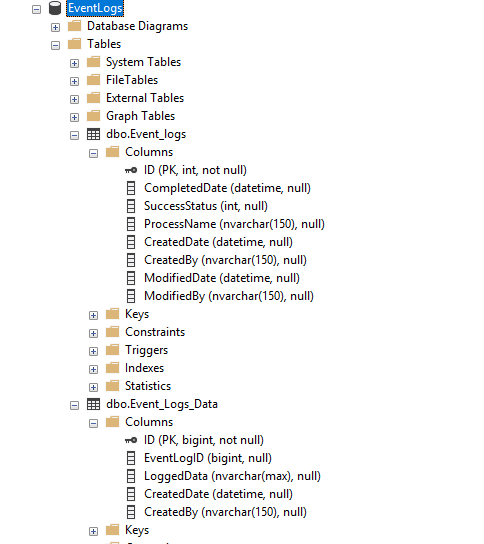
You can use this code below to create that database and table.
USE [master]
GO

CREATE DATABASE [EventLogs]
 CONTAINMENT = NONE
 ON  PRIMARY
( NAME = N'EventLogs', FILENAME = N'E:\DATA\EventLogs.mdf' , SIZE = 8192KB , MAXSIZE = UNLIMITED, FILEGROWTH = 65536KB )
 LOG ON
( NAME = N'EventLogs_log', FILENAME = N'E:\Logs\EventLogs_log.ldf' , SIZE = 8192KB , MAXSIZE = 2048GB , FILEGROWTH = 65536KB )
 WITH CATALOG_COLLATION = DATABASE_DEFAULT, LEDGER = OFF
GO
ALTER DATABASE [EventLogs] SET COMPATIBILITY_LEVEL = 160
GO
IF (1 = FULLTEXTSERVICEPROPERTY('IsFullTextInstalled'))
begin
EXEC [EventLogs].[dbo].[sp_fulltext_database] @action = 'enable'
end
GO
ALTER DATABASE [EventLogs] SET ANSI_NULL_DEFAULT OFF
GO
ALTER DATABASE [EventLogs] SET ANSI_NULLS OFF
GO
ALTER DATABASE [EventLogs] SET ANSI_PADDING OFF
GO
ALTER DATABASE [EventLogs] SET ANSI_WARNINGS OFF
GO
ALTER DATABASE [EventLogs] SET ARITHABORT OFF
GO
ALTER DATABASE [EventLogs] SET AUTO_CLOSE OFF
GO
ALTER DATABASE [EventLogs] SET AUTO_SHRINK OFF
GO
ALTER DATABASE [EventLogs] SET AUTO_UPDATE_STATISTICS ON
GO
ALTER DATABASE [EventLogs] SET CURSOR_CLOSE_ON_COMMIT OFF
GO
ALTER DATABASE [EventLogs] SET CURSOR_DEFAULT  GLOBAL
GO
ALTER DATABASE [EventLogs] SET CONCAT_NULL_YIELDS_NULL OFF
GO
ALTER DATABASE [EventLogs] SET NUMERIC_ROUNDABORT OFF
GO
ALTER DATABASE [EventLogs] SET QUOTED_IDENTIFIER OFF
GO
ALTER DATABASE [EventLogs] SET RECURSIVE_TRIGGERS OFF
GO
ALTER DATABASE [EventLogs] SET  DISABLE_BROKER
GO
ALTER DATABASE [EventLogs] SET AUTO_UPDATE_STATISTICS_ASYNC OFF
GO
ALTER DATABASE [EventLogs] SET DATE_CORRELATION_OPTIMIZATION OFF
GO
ALTER DATABASE [EventLogs] SET TRUSTWORTHY OFF
GO
ALTER DATABASE [EventLogs] SET ALLOW_SNAPSHOT_ISOLATION OFF
GO
ALTER DATABASE [EventLogs] SET PARAMETERIZATION SIMPLE
GO
ALTER DATABASE [EventLogs] SET READ_COMMITTED_SNAPSHOT OFF
GO
ALTER DATABASE [EventLogs] SET HONOR_BROKER_PRIORITY OFF
GO
ALTER DATABASE [EventLogs] SET RECOVERY SIMPLE
GO
ALTER DATABASE [EventLogs] SET  MULTI_USER
GO
ALTER DATABASE [EventLogs] SET PAGE_VERIFY CHECKSUM
GO
ALTER DATABASE [EventLogs] SET DB_CHAINING OFF
GO
ALTER DATABASE [EventLogs] SET FILESTREAM( NON_TRANSACTED_ACCESS = OFF )
GO
ALTER DATABASE [EventLogs] SET TARGET_RECOVERY_TIME = 60 SECONDS
GO
ALTER DATABASE [EventLogs] SET DELAYED_DURABILITY = DISABLED
GO
ALTER DATABASE [EventLogs] SET ACCELERATED_DATABASE_RECOVERY = OFF
GO
ALTER DATABASE [EventLogs] SET QUERY_STORE = ON
GO
ALTER DATABASE [EventLogs] SET QUERY_STORE (OPERATION_MODE = READ_WRITE, CLEANUP_POLICY = (STALE_QUERY_THRESHOLD_DAYS = 30), DATA_FLUSH_INTERVAL_SECONDS = 900, INTERVAL_LENGTH_MINUTES = 60, MAX_STORAGE_SIZE_MB = 1000, QUERY_CAPTURE_MODE = AUTO, SIZE_BASED_CLEANUP_MODE = AUTO, MAX_PLANS_PER_QUERY = 200, WAIT_STATS_CAPTURE_MODE = ON)
GO
USE [EventLogs]
GO

SET ANSI_NULLS ON
GO
SET QUOTED_IDENTIFIER ON
GO
CREATE TABLE [dbo].[Event_logs](
 [ID] [int] IDENTITY(1,1) NOT NULL,
 [CompletedDate] [datetime] NULL,
 [SuccessStatus] [int] NULL,
 [ProcessName] [nvarchar](150) NULL,
 [CreatedDate] [datetime] NULL,
 [CreatedBy] [nvarchar](150) NULL,
 [ModifiedDate] [datetime] NULL,
 [ModifiedBy] [nvarchar](150) NULL,
 CONSTRAINT [PK_Event_logs] PRIMARY KEY CLUSTERED
(
 [ID] ASC
)WITH (PAD_INDEX = OFF, STATISTICS_NORECOMPUTE = OFF, IGNORE_DUP_KEY = OFF, ALLOW_ROW_LOCKS = ON, ALLOW_PAGE_LOCKS = ON, OPTIMIZE_FOR_SEQUENTIAL_KEY = OFF) ON [PRIMARY]
) ON [PRIMARY]
GO

SET ANSI_NULLS ON
GO
SET QUOTED_IDENTIFIER ON
GO
CREATE TABLE [dbo].[Event_Logs_Data](
 [ID] [bigint] IDENTITY(1,1) NOT NULL,
 [EventLogID] [bigint] NULL,
 [LoggedData] [nvarchar](max) NULL,
 [CreatedDate] [datetime] NULL,
 [CreatedBy] [nvarchar](150) NULL,
 CONSTRAINT [PK_Event_Logs_Data] PRIMARY KEY CLUSTERED
(
 [ID] ASC
)WITH (PAD_INDEX = OFF, STATISTICS_NORECOMPUTE = OFF, IGNORE_DUP_KEY = OFF, ALLOW_ROW_LOCKS = ON, ALLOW_PAGE_LOCKS = ON, OPTIMIZE_FOR_SEQUENTIAL_KEY = OFF) ON [PRIMARY]
) ON [PRIMARY] TEXTIMAGE_ON [PRIMARY]
GO
ALTER TABLE [dbo].[Event_logs] ADD  CONSTRAINT [DF_Event_logs_SuccessStatus]  DEFAULT ((0)) FOR [SuccessStatus]
GO
ALTER TABLE [dbo].[Event_logs] ADD  CONSTRAINT [DF_Event_logs_CreatedDate]  DEFAULT (getdate()) FOR [CreatedDate]
GO
USE [master]
GO
ALTER DATABASE [EventLogs] SET  READ_WRITE
GO
Worth noting at this point. when we log entries into the log table, this is the KEY I came up with to identify row statuses.
| Status Code | Status Text | Description |
| 0 | Running.. | when an ssis has started running and isnt complete. |
| 1 | Success | The SSIS package finished with a status of 1 marking it completed OK |
| 2 | Failed | The SSIS package has finished and failed. so it marked the record as 2 |
| 1 | 2 | 3 | 4 | 5 | 6 | 7 |
| PC setup | Create an SSIS package. | Renaming the package. | Database Connection to Log File. | Error Logging - Event Handler. | Security. lock down your SSIS | Package template |
You should have visual studio installed (Pro or community if your learning). VS2022 is readily available and recommended until 2026 is fully tested for SSIS.
You will also need to download the SSIS prjects You can download from here
You need this to be able to create/ maintain SSIS packages.
As the speal says "used for building high performance data integration and workflow solutions, including extraction, transformation, and loading (ETL) operations for data warehousing. "
Open visual studio and create a new project. search for SSIS in the top bar, and select "integtion services project" from the list
Populate the project name e.g. "SSIS_Template", and specify where you're going to save the project. and click "Create".
You should now be in the project, ready to start configuring.
Why do we want to rename the package? When we deploy a package to the SQL server, this will be the name that is shown. So we want to be able to recognise the correct package in the list.
Down the right hand side, under the solution, you will see inside the SSIS Packages, a file called "package.dtsx". we want to rename this to be something meaningful.
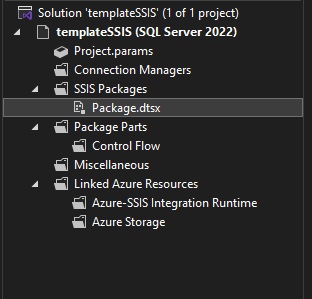
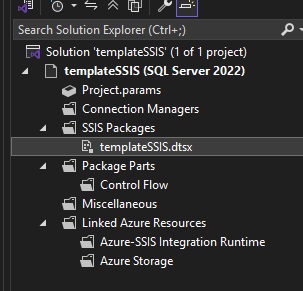
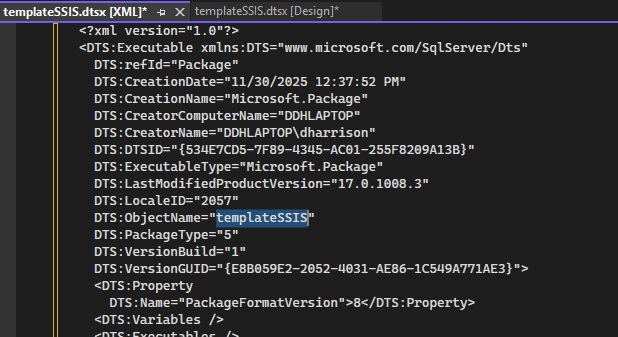
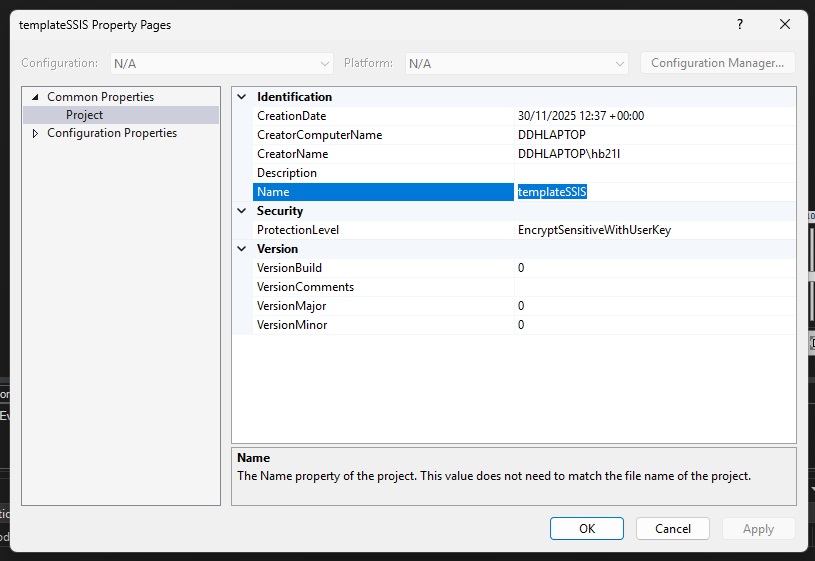
lets also check the project Properties, Click project from the menu bar, then properties.
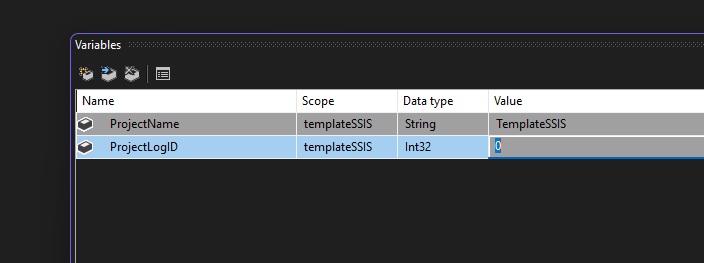
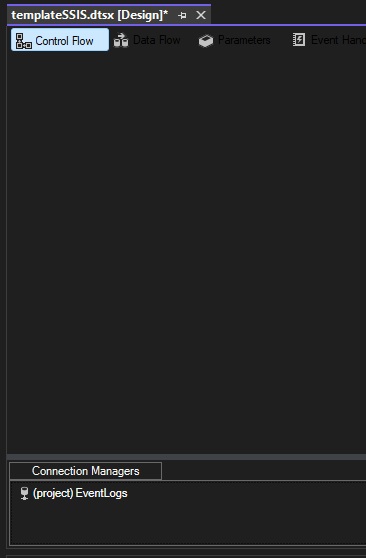
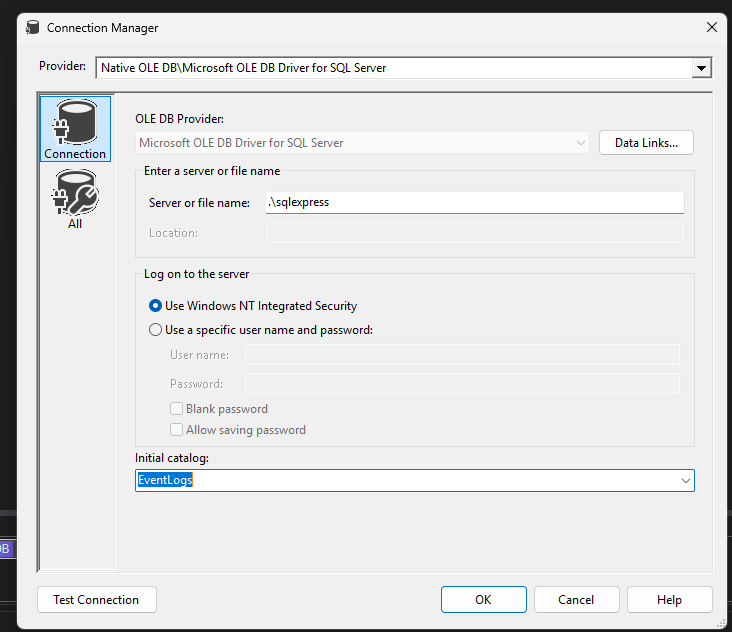
Under 'control flows', we should have a widget for "connection mananger". this is where we define our connections to databases, files, and other external sources. Yours will probably be empty, so right click and make a new OLE DB connection. You want to point it to your database logs database.
For the eagle eyed ones of you,. No, you can't run SSIS on SQL express, but this is just a demo. 😎
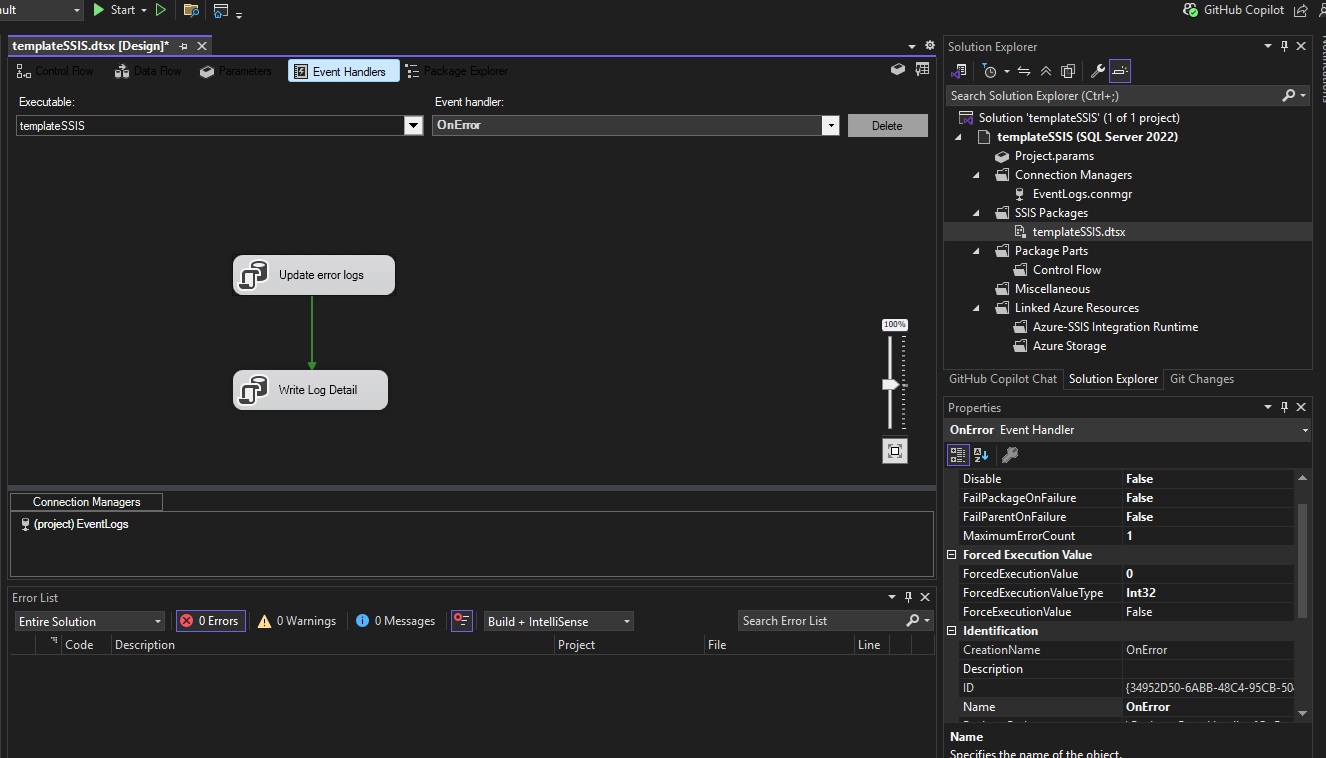
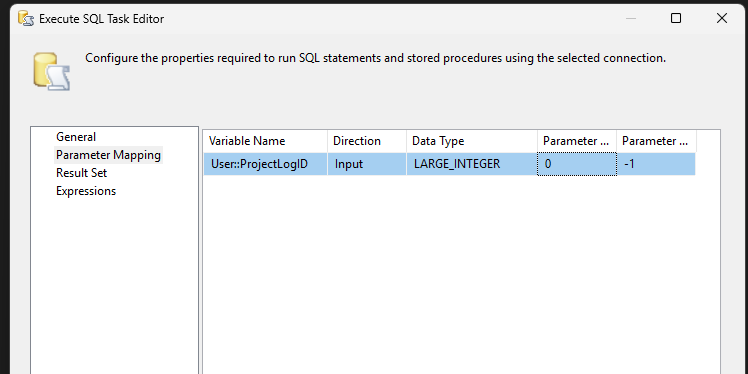
B. "Write Log Detail"
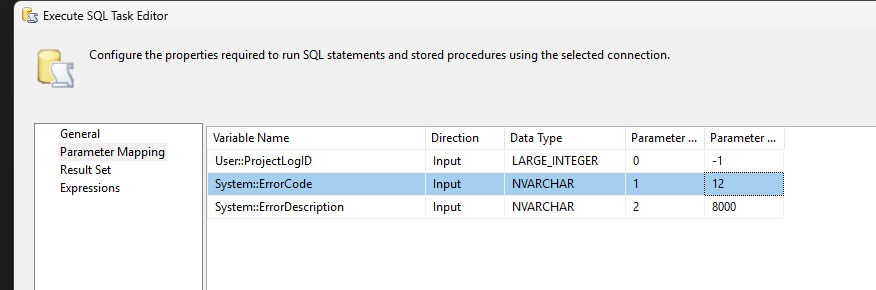
insert into EVENT_LOGS_DATA ( EventLogID, Loggeddata ) values (?, ' Code: ' + ? + ' error message: ' + ?)
Within the second SQL task, when we write the details, we can pass into the parameters the [system error code] and [system error description]. as below.
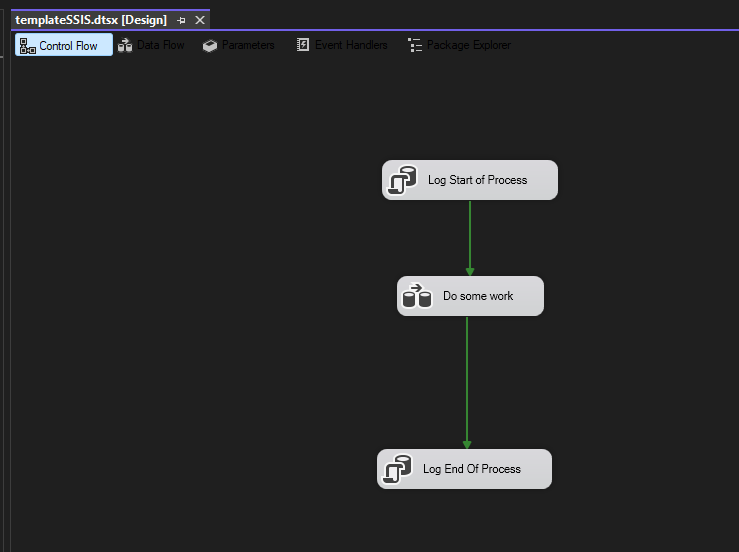
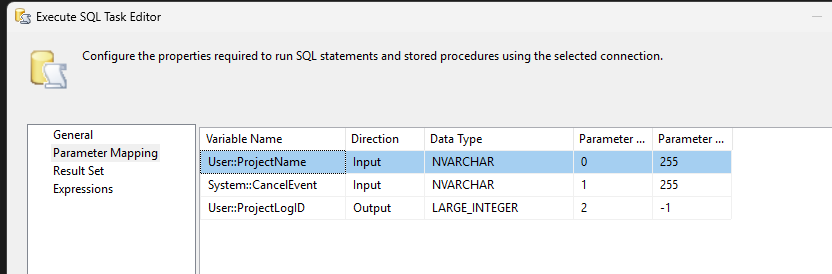
I have my SSIS setup like this, as it works for me. At the top I have "log start of process". this writes my variable name to the log table and returns an ID number, which I assign to [my project ID number] variable.
                                    insert into Event_Logs
                                    (createdby, ProcessName)
                                    values
                                    ( ?,? );
                                    select ? =@IDENTITY
And Very similarly I have the same at the bottom that marks the task as complete in the log table.
                                    update Event_Logs
                                    set
                                    CompletedDate= getdate(),
                                    SuccessStatus=1
                                    where ID = ?
                                    and successStatus=0
In the middle we can add any processes we want (the main body of our SSIS package.) as this is only a template, I just leave that empty Data Task Flow.
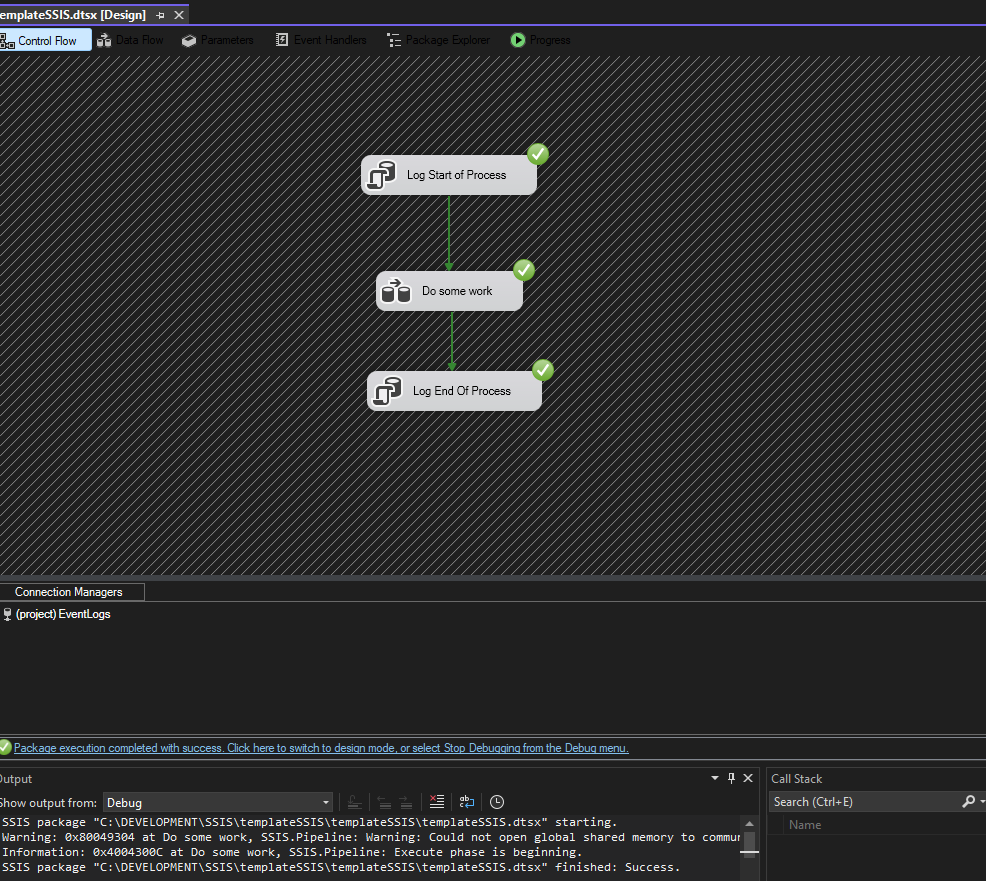
And your done. Compile the app and check the output BIN folder. you will find a [ispac] file waiting for you. You need this for future projects.
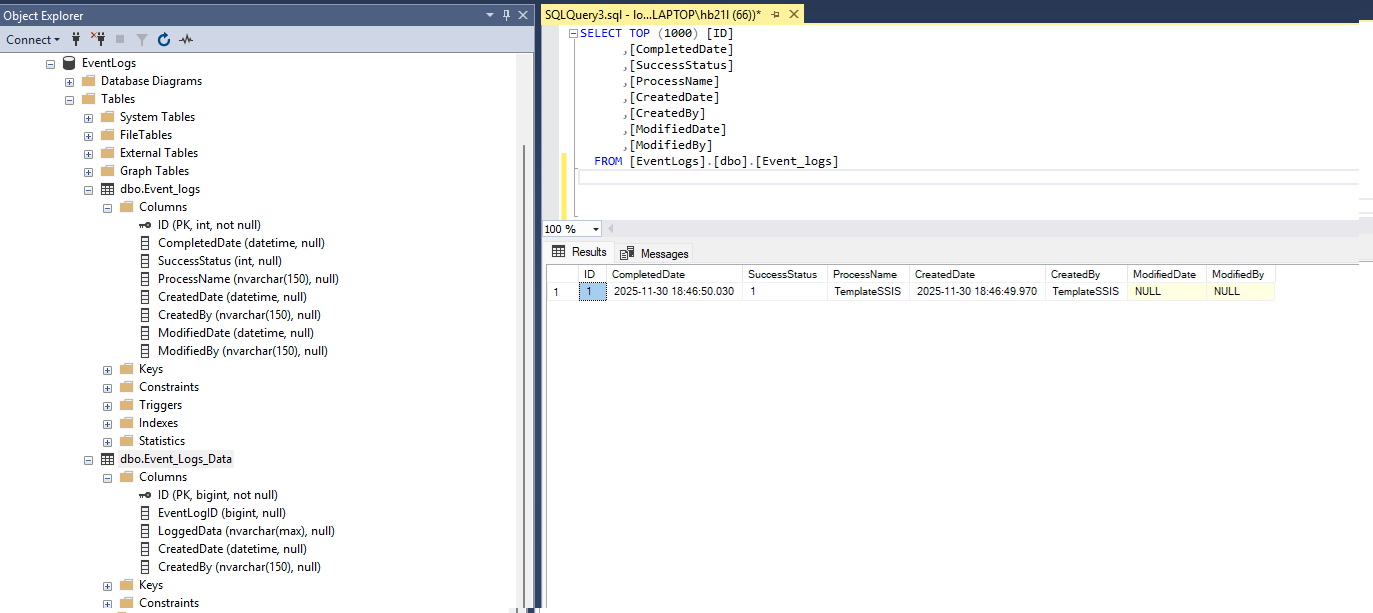
And when we view the database, we should see the entry in there.
Create a new project and search for SSIS, but this time select the wizard.

This time, its going to ask you for the the ISPAC file you created earlier..

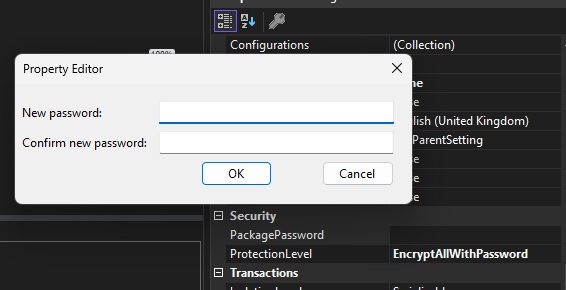
As part of the import process, it should ask you for the password twice!
Once the project has loaded up, it will be as you had setup your template. So your going to want to change the package and project names.